

Managing Microsoft tools
Setting up the Connection
The setup process for Excel, Outlook and other Microsoft tools require an Entra admin (Microsoft Entra ID 'privileged role administrator' or 'application administrator') who is also a Dust Admin. This ensures full access to the necessary permissions.
It is recommended for Admins to perform the following steps from a Private browser session or a new browser, to avoid using their currently active Microsoft session.
Under Spaces > Tools, Select Add Tools. Then select a Microsoft tool.
An OAuth modal will appear to allow you to allow Dust to access Microsoft account.
On the first connection, tick the box Consent on behalf of your authorization. When this checkbox does not appear, it means that an EntraID admin will need to validate your Consent Request from the Admin consent requests panel
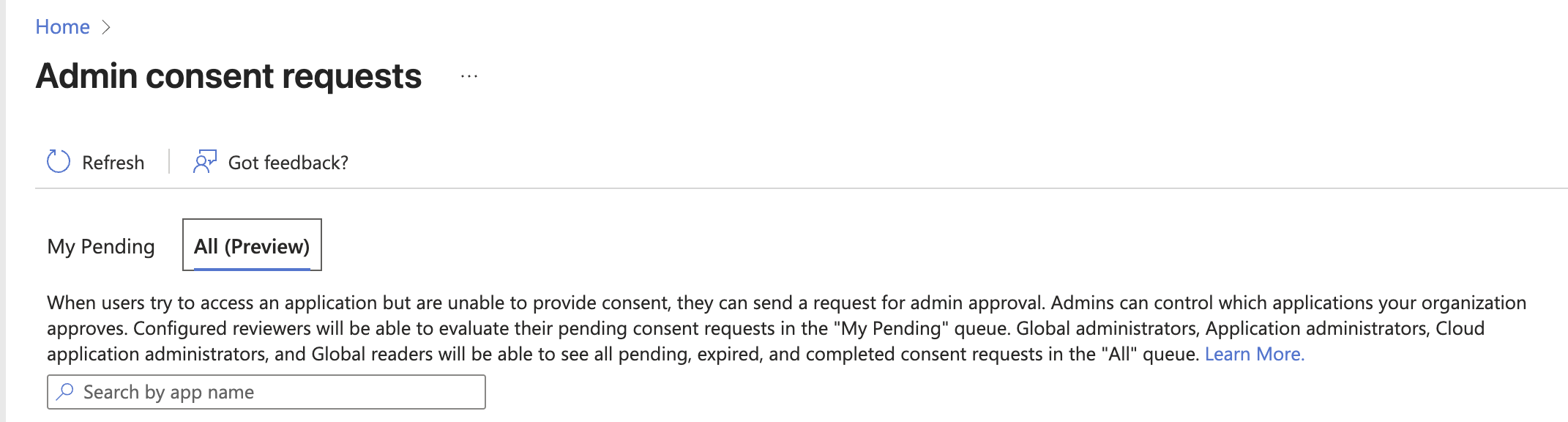
NB : If you're not an admin on your Microsoft workspace, will have to ask your administrator to consent Dust permissions for you. Once you clicked on "Request Admin consent", you will have to wait for the administrator to validate your request in their Azure admin panel (nb : this might take a few minutes before showing up on the Azure admin panel)Once authorised, perform step 3 again. This time around, the connection will finalize.
Alternative setup outside of Dust
Entra admins can also decide to create the application in Entra themselves, and will need the following consent URL (example for Outlook+Sharepoint, tweak the scopes as needed with the following permission matrix)
https://login.microsoftonline.com/{{your-entra-tenant-id}}/adminconsent
  ?client_id=202baa96-190d-4f72-a7da-e5a73fa37277
  &scope=https://graph.microsoft.com/Files.Read.All
         https://graph.microsoft.com/Sites.Read.All
         https://graph.microsoft.com/Mail.ReadWrite
         https://graph.microsoft.com/Mail.ReadWrite.Shared
         https://graph.microsoft.com/Contacts.ReadWrite
         https://graph.microsoft.com/Contacts.ReadWrite.Shared
         https://graph.microsoft.com/User.Read
         offline_access
  &redirect_uri=https://{{eu. when in Europe}}dust.tt/oauth/microsoft/finalize
The Dust-Tools Application in EntraID
When consenting on behalf of your organization, (or requesting your admin to do so) Dust will create an entreprise application in Entra.
The following permissions will be requested by the app. In this case, the Delegated type means that even if the requested permission claim is high, it will be delegated to the user when using Dust. (ie. if a user cannot read chatMessages, they won't be able to by using the Dust-Tools app)
Outlook (MCP Tool) - delegated permissions
Mail.ReadWrite- Read and write user mailMail.ReadWrite.Shared- Read and write shared mailContacts.ReadWrite- Full access to user contactsContacts.ReadWrite.Shared- Read and write shared contactsUser.Read- Sign in and read user profileoffline_access- Maintain access to data
Outlook Calendar (MCP Tool) - delegated permissions
Calendars.ReadWrite- Read and write calendarsCalendars.ReadWrite.Shared- Read and write shared calendarsUser.Read- Sign in and read user profileMailboxSettings.Read- Read mailbox settingsoffline_access- Maintain access to data
Microsoft Drive (MCP Tool) - delegated permissions
User.Read- Sign in and read user profileFiles.ReadWrite.All- Full access to all files user can accessSites.Read.All- Read items in all site collectionsExternalItem.Read.All- Read items in external datasetsoffline_access- Maintain access to data
Microsoft Teams (MCP Tool) - delegated permissions
User.Read- Sign in and read user profileUser.ReadBasic.All- Read all users' basic profilesTeam.ReadBasic.All- Read names and descriptions of teamsChannel.ReadBasic.All- Read channel names and descriptions [2,3]Chat.Read- Read user chat messagesChat.ReadWrite- Read and write user chat messagesChatMessage.Read- Read user chat messagesChatMessage.Send- Send user chat messagesChannelMessage.Read.All- Read user channel messagesChannelMessage.Send- Send channel messagesoffline_access- Maintain access to data
Microsoft Excel (MCP Tool) - delegated permissions
User.Read- Sign in and read user profileFiles.ReadWrite.All- Full access to all files user can accessSites.Read.All- Read items in all site collectionsoffline_access- Maintain access to data
Summary Table
| Scope | Used By |
|---|---|
Channel.ReadBasic.All | Microsoft Teams MCP |
ChannelMessage.Read.All | Microsoft Teams MCP |
ChannelMessage.Send | Microsoft Teams MCP |
Chat.Read | Microsoft Teams MCP |
Chat.ReadWrite | Microsoft Teams MCP |
ChatMessage.Read | Microsoft Teams MCP |
ChatMessage.Send | Microsoft Teams MCP |
Contacts.ReadWrite | Outlook MCP |
Contacts.ReadWrite.Shared | Outlook MCP |
ExternalItem.Read.All | Microsoft Drive MCP |
Files.ReadWrite.All | Microsoft Drive MCP, Microsoft Excel MCP |
Mail.ReadWrite | Outlook MCP |
Mail.ReadWrite.Shared | Outlook MCP |
offline_access | All Microsoft Tools |
Sites.Read.All | Microsoft Connector, Microsoft Drive MCP, Microsoft Excel MCP |
Team.ReadBasic.All | Microsoft Teams MCP |
User.Read | All Microsoft Tools |
User.ReadBasic.All | Microsoft Teams MCP |
Calendars.ReadWrite | Outlook Calendar MCP |
Calendars.ReadWrite.Shared | Outlook Calendar MCP |
MailboxSettings.Read | Outlook Calendar MCP |
Updated 5 months ago