

Dev : pre-configuring a custom MCP server
Pre-configuration
General introduction
When doing regular function calling the agent exposes to the LLM what parameters the function needs through a schema. The LLM then answers with valid parameters matching this schema, allowing the agent to effectively execute the function. References here and here.
This behavior integrates with the Model Context Protocol, more specifically the official TypeScript SDK, in the following way:
- When defining the tools for an MCP server a Zod schema the inputs of the tool will be validated against can be provided.
- When listing tools using the
tools/listendpoint, this Zod schema is derived into a JSON schema, which is included in the response for the MCP client to show the LLM. - The answer of the LLM contains valid inputs, which can be passed in turn to the
tools/callendpoint directly. When calling a tool the input is validated against the Zod schema.
All of this is abstracted when using the SDK, here is a minimal example for implementing an MCP server.
const server = new McpServer({
  name: "my-server",
  version: "1.0.0",
  description: "Server description"
});

server.tool(
  "tool-name",
  "Tool description",
  {
    paramName: z.string().describe("Parameter description")
  },
  async (params) => {
    // Tool implementation
  }
);
Integration in the Agent Builder
In some contexts, some of the parameters should be pre-configured. Notable examples include static URLs, mail addresses, certain inputs to API calls: parameters that are not known by the model and should be set statically when configuring the tool.
We provide input schemas that you can use when defining a tool to enable the following behavior:
- Input parameters can be defined and configured in the Assistant Builder.
- These parameters are hidden from the LLM.
- Pre-configured values are injected when the tool runs.
To leverage this feature, we expose in our TypeScript SDK reusable Zod schemas that you can add to your tool definitions to specify pre-configured inputs.
For instance, let's look at the following server definition.
import { INTERNAL_MIME_TYPES, ConfigurableToolInputSchemas } from "@dust-tt/client";
import { McpServer } from "@modelcontextprotocol/sdk/server/mcp.js";
import { z } from "zod";

const server = new McpServer({
  name: "my-server",
  version: "1.0.0",
  description: "Server description"
});

server.tool(
  "tool-name",
  "Tool description",
  {
    query: z.string(), // Filled in by the LLM
    name: ConfigurableToolInputSchemas[
      INTERNAL_MIME_TYPES.TOOL_INPUT.STRING // Pre-configured
    ],
    age: ConfigurableToolInputSchemas[
      INTERNAL_MIME_TYPES.TOOL_INPUT.NUMBER // Pre-configured
    ],
    hasApplied:
      ConfigurableToolInputSchemas[
        INTERNAL_MIME_TYPES.TOOL_INPUT.BOOLEAN // Pre-configured
      ],
  },
  async (params) => {
    // Tool implementation
  }
);
This server definition will lead to the following screen in the Agent Builder.
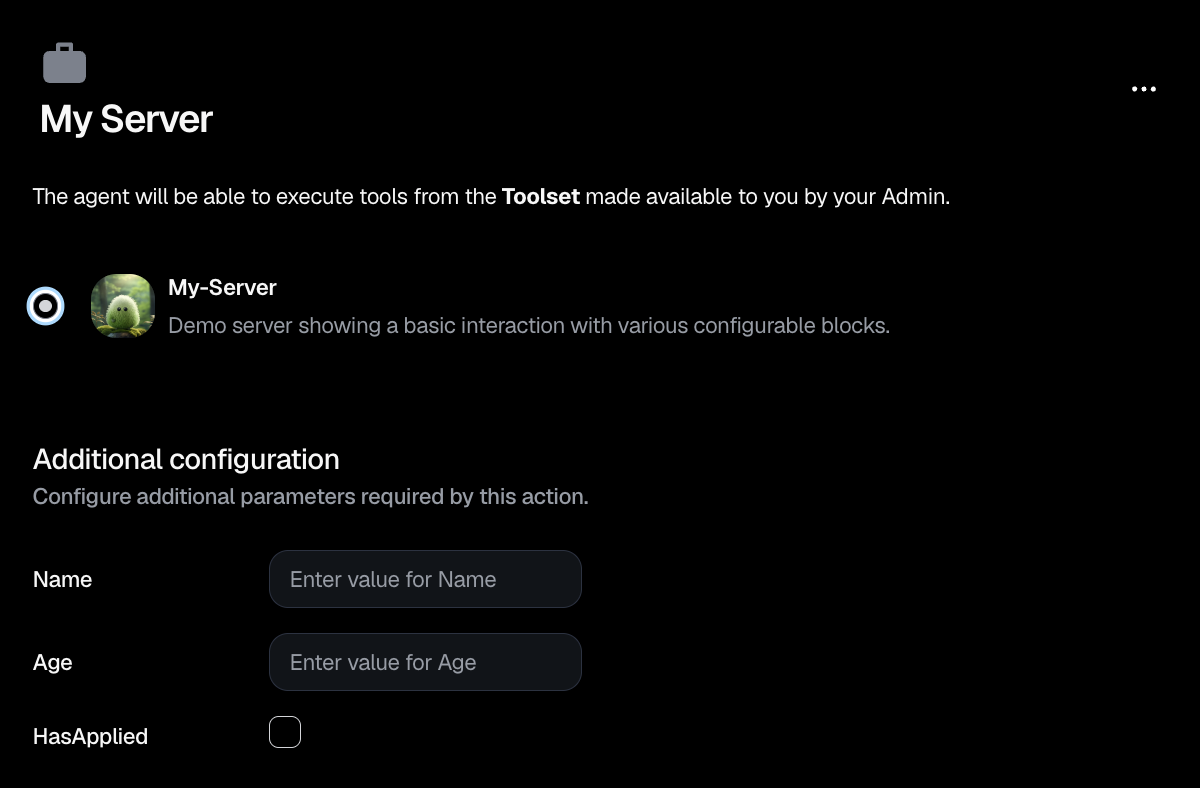
The configuration input here is tied to the agent configuration and will be returned as is when running the tool.
This mechanism in itself is language agnostic, if you are building MCP servers in another language, you have to define arguments in a way that will resolve to the same JSON Schema. For instance in Python you could use Pydantic in the following way:
from pydantic import BaseModel, Field
from typing import Literal

TOOL_INPUT_BOOLEAN_MIME_TYPE = "application/vnd.dust.tool_input.boolean"
TOOL_INPUT_NUMBER_MIME_TYPE = "application/vnd.dust.tool_input.number"
TOOL_INPUT_STRING_MIME_TYPE = "application/vnd.dust.tool_input.string"

class BooleanToolInput(BaseModel):
    """
    Pydantic model for boolean tool input.
    """
    value: bool
    mimeType: Literal[TOOL_INPUT_BOOLEAN_MIME_TYPE]


class NumberToolInput(BaseModel):
    """
    Pydantic model for numeric tool input.
    """
    value: str
    mimeType: Literal[TOOL_INPUT_NUMBER_MIME_TYPE]


class StringToolInput(BaseModel):
    """
    Pydantic model for string tool input.
    """
    value: str
    mimeType: Literal[TOOL_INPUT_STRING_MIME_TYPE]
These will resolve into the following JSON Schemas:
{
  type: "object",
  properties: {
    value: {
      type: "boolean",
    },
    mimeType: {
      type: "string",
      const: "application/vnd.dust.tool_input.boolean",
    },
  },
  required: ["value", "mimeType"],
}{
type: "object",
properties: {
value: {
type: "number",
},
mimeType: {
type: "string",
const: "application/vnd.dust.tool_input.number",
},
},
required: ["value", "mimeType"]
}{
type: "object",
properties: {
value: {
type: "string",
},
mimeType: {
type: "string",
const: "application/vnd.dust.tool_input.string",
},
},
required: ["value", "mimeType"]
}ef